How to Share Public Link of an Event Type in Agiled
Introduction Agiled allows you to share an event type with your audience, clients, contacts, or leads so that they can book a meeting with you. You can share th
Updated 1 min read
Introduction
Agiled allows you to share an event type with your audience, clients, contacts, or leads so that they can book a meeting with you. You can share this either by embedding it on your website or through a public link. In this video, we're going to focus on how to share a public link of an event type.
Steps to Share a Public Link of an Event Type in Agiled
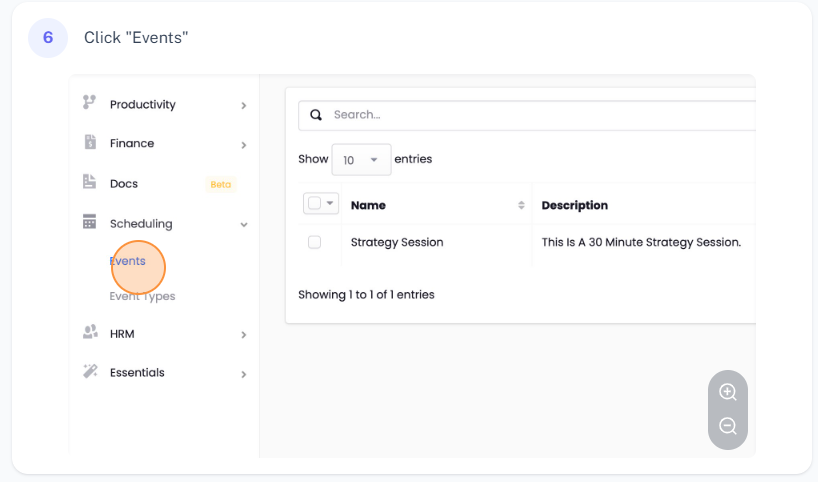
1. **Navigate to the Event Types Page**: Start by going to the event types page which lists all your event types.

2. **Select an Event to Share**: Choose the event type you wish to share. In this example, we're sharing the 'Strategy Session' event type.
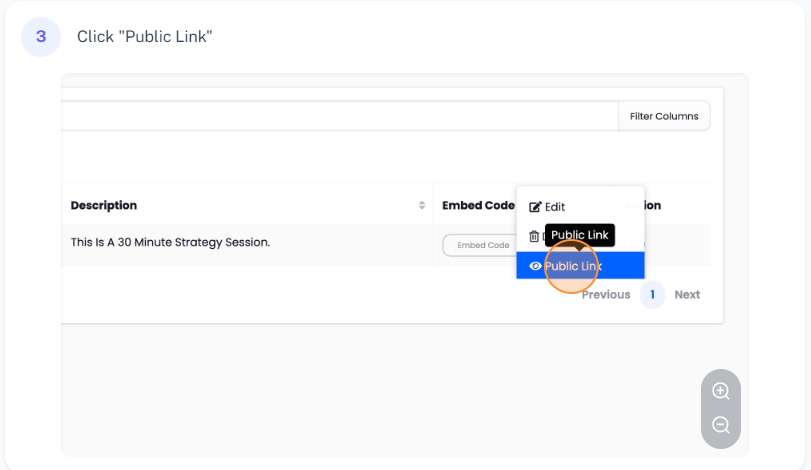
3. **Access the Public Link**: Click on the 'Actions' dropdown menu corresponding to the selected event type, and then click on the 'Public Link' option. This action will take you to the public page of the event type.
4. **Copy the Public Link**: From the public page, you can copy the link to the event. This link can be added to your website, behind a button, or a hypertext. Alternatively, you can send this link directly to your clients or leads via an email, text, WhatsApp, or any communication method of your choice.
Conclusion
And that's it! That's how you share a public link of an event type in Agiled. This functionality simplifies the process of allowing others to book meetings with you. Thank you for watching this tutorial.
Was this article helpful?
More in Docs
- Agiled Docs Overview : Creating Contracts & Proposals in AgiledAgiled has introduced a comprehensive and improved Docs experience based on user feedback and suggestions. This enhanced feature includes a wide range of improv
- How to add a cover pageIntroduction: In this tutorial, we will show you how to add and customize a cover page for your documents, proposals, or contracts in Agiled Docs. Cover pages c
- How Clients Can Sign Documents in AgiledIntroduction: In this tutorial, we will guide you through how your clients can sign the documents you sent them using Agiled. Signing documents in Agiled is a s
- How to use Merge Tags in Agiled DocsIntroduction In this tutorial, we'll show you how to use merge tags in Agiled Docs to personalize your contracts or proposals with client data from the CRM. Mer
Questions about this? Agiled Assist answers from these articles.