How to delete an Event Type in Agiled
Introduction Hello everyone! In this video tutorial, I'm going to walk you through the steps to delete an event type in Agiled. There might be instances when yo
Updated 1 min read
Introduction
Hello everyone! In this video tutorial, I'm going to walk you through the steps to delete an event type in Agiled. There might be instances when you no longer need a particular event type and want to clear it out from your dashboard. Agiled makes this process very straightforward.
Steps to Delete an Event Type in Agiled
1. **Navigate to the Event Type Page**: Start by going to the 'Event Type' page. Here, you'll find a list of all the event types that you've created.

2. **Select the Event Type to Delete**: Find the event type you want to delete. In this instance, I'll be deleting the event type I've previously created.
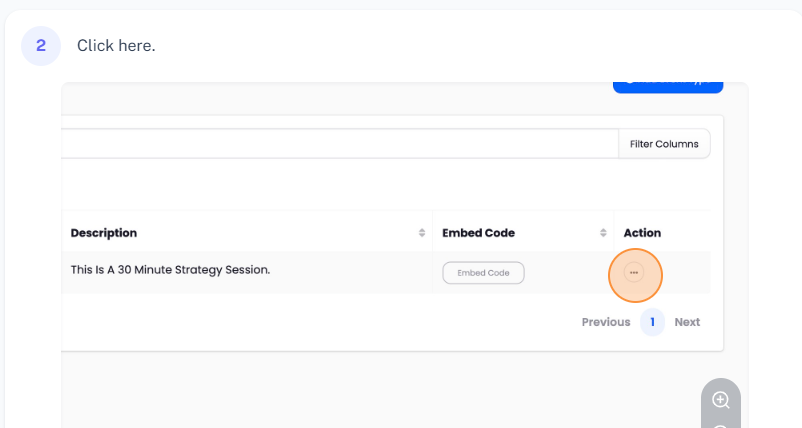
3. **Click on 'Actions'**: Under the 'Actions' column, click on the three dots. This will open a dropdown menu with several options.
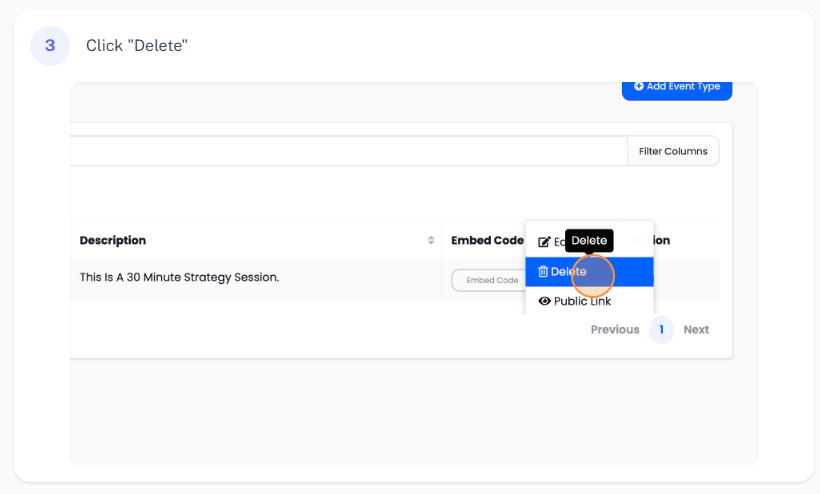
4. **Choose 'Delete'**: In the dropdown menu, click on the 'Delete' button.
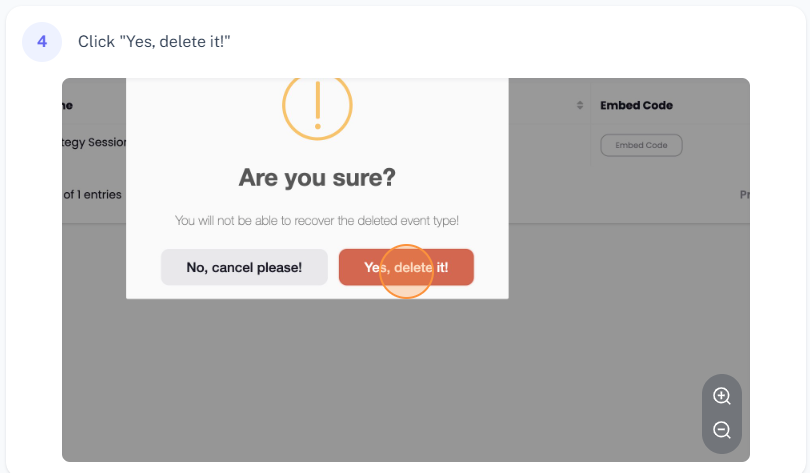
5. **Confirm Deletion**: A prompt will pop up asking for confirmation. This step ensures you haven't clicked the 'Delete' button by accident. If you're sure you want to delete the event type, go ahead and click on the 'Delete it' button.
6. **Verify Deletion**: After you've confirmed deletion, Agiled will delete the event type from your account. You should now see that it has been removed from the list on the 'Event Type' page.
Conclusion
And that's it! That's how you delete an event type in Agiled. This easy-to-follow process can help you manage and organize your event types effectively. Thanks for watching this video!
Was this article helpful?
More in Scheduling
- How to Sync events and avoid double booking.Introduction In this tutorial, we will guide you on how to avoid double booking in Agiled, how to sync events with your calendars in real time, and how to add e
- How to edit an Event Type in AgiledIntroduction In this tutorial, we'll guide you through the process of editing an event type in Agiled. Whether you need to adjust the meeting platform, the dura
- How to create an EventFor creating an event, follow the steps below: 1. Go to the 'Scheduling' on the toolbar and click on the "Events". 2. Click on 'Create Event' present at the top
- Cancelling a Scheduled Event or Meeting in AgiledIntroduction Welcome, in this video tutorial, I'll be walking you through the process of cancelling a scheduled event or meeting in Agiled, an all-in-one busine
Questions about this? Agiled Assist answers from these articles.